Skip to content

Saw someone at the event? Find out if it's mutual.

CROSS shows you who's at your event. Show interest privately. If it's mutual, you both get a match and can go and say hello.

At the event your browser is enough. With the app you can chat after a match. 18+ only.

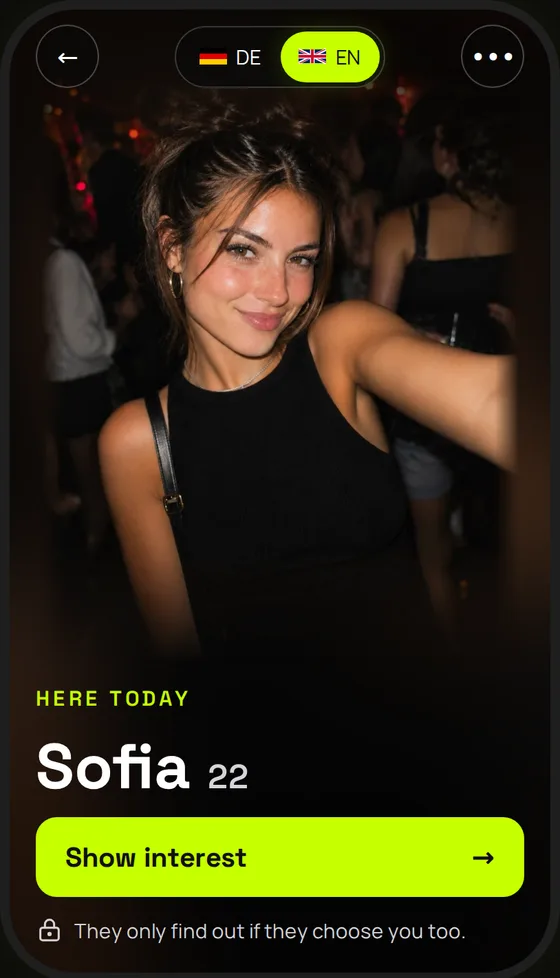
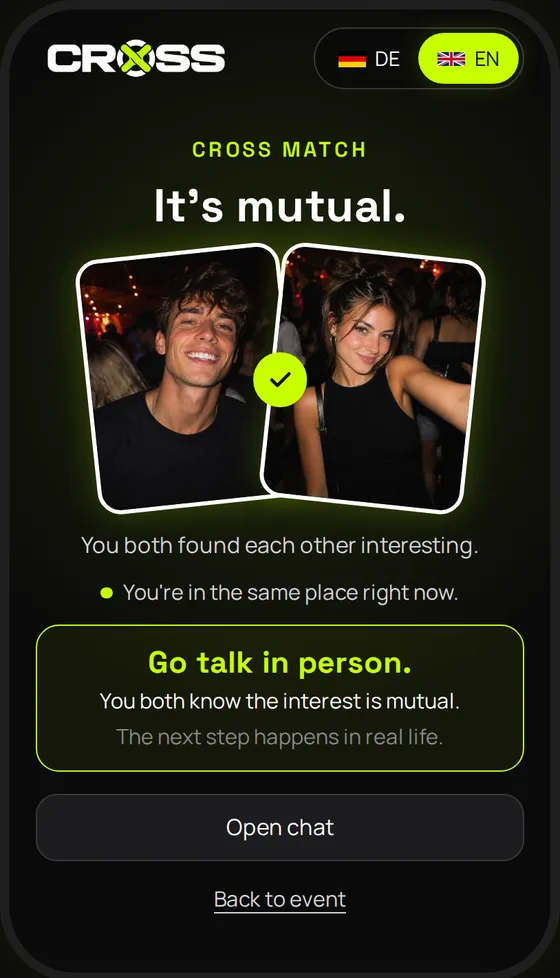
The CROSS match screen on a phone: “It's mutual.” with two photos
Example views. The portraits are AI-generated.

For guests

How it works

From the poster to the first hello takes only a few minutes. Everything runs in the phone's browser.

  1. Step 1

    Scan the QR code

    Scan the code at the event – it opens in your browser, no download and no sign-up.

  2. Step 2

    Create a short profile

    First name, age, gender and a photo – visible only to guests of this event, delete it any time.

  3. Step 3

    See who's here and show interest

    Show interest privately – nobody sees whom you picked, not even the person themselves.

  4. Step 4

    It's mutual? It's a match!

    Only when it’s mutual do you both see the match – then go and say hi.

For organizers

An extra for your event that your guests will talk about.

CROSS gets people talking. It needs no new technology on site and hardly any effort from your team. During the pilot phase we set everything up for you, free of charge.

Pilot phase

Free for the first events

We're looking for the first organizers who want to try CROSS with their guests. No fees and no advertising.

Request your event

What you get

  • Your event fully set up in CROSS, with your event name
  • Print-ready posters and table cards with your QR code
  • Personal support before the event and, where possible, on site
  • Anonymous figures afterwards: guests, interest shown, matches
  • An image for your Instagram story and a short text for the announcement
  • German and English, ideal for international guests too

What you do

  • Give us the date, times and a contact person for the event
  • Put up the posters and table cards where people wait
  • Optional: post a story beforehand
  • Optional: a short announcement from the DJ or host

How your event runs

  1. 2–4 weeks before

    Get in touch

    Tell us about your event. We'll clarify the date, expected guests, the venue and mobile reception together.

  2. 1–2 weeks before

    We set it up

    Your event is created in CROSS, tested, and the posters are made with your real QR code.

  3. 1 week before

    Print and promote

    You receive the posters ready to print, plus an image for your story if you'd like one.

  4. On the day

    Guests join

    Guests scan the code from the start of the event. New profiles appear in the guest list automatically.

  5. The day after

    See the numbers

    You receive the anonymous figures. Two days after the end, the guests' event profiles are deleted automatically.

More details: statistics, suitable events and what's needed on site

You see numbers, never people

As an organizer you never see who took part or who showed interest in whom. Statistics are aggregated, start at 10 guests, and small values are shown as “fewer than 5” so that nobody can draw conclusions about individuals.

  • Guests
  • Interest shown
  • Matches

Where CROSS fits well

Student events

Semester openings, faculty events and graduations, where many people don't know each other yet.

International groups

Events for Erasmus and exchange students who are new to the city. CROSS runs in English and German.

Clubs and bars

Theme nights and regular events that want to stand out with something new.

Event series

Recurring formats with their own community, where guests get a new reason to come back.

CROSS works best from about 50 participating guests. The more people join, the more matches there are. CROSS is for adults only. If younger guests also attend your event, the posters clearly state “18+”.

What's needed on site

  • Mobile reception or guest Wi-Fi, because CROSS needs internet
  • Well-lit places for the posters: entrance, bar, cloakroom
  • Nothing else: no devices, no installation, no staff training

On-site incidents remain the responsibility of your security or awareness team. Reports in CROSS are reviewed by the CROSS team.

Privacy & safety

Built so that as little as possible needs protecting.

CROSS deals with sensitive moments, so privacy isn't an add-on here. It's built into the product.

Interest stays private

There is no list of who showed interest in you. Neither guests nor organizers can see it. Only a mutual match becomes visible, and only to the two people involved.

Automatic deletion

Event profiles and photos are deleted automatically 2 days after the event, unless you voluntarily link your profile to an account after a match. You can delete your profile yourself at any time.

As little data as possible

First name, age, gender and a photo. No last name, no phone number and, at the event, no e-mail address. Location and camera data are removed from photos.

For adults only

CROSS is for people aged 18 and over. The age is asked when joining, and anyone who enters an age under 18 cannot join.

Show more

Report and block

Every profile can be reported and blocked. Blocked people no longer see each other. The CROSS team reviews reports and can remove profiles.

Clear rules

Sexual or intimate content is forbidden, even with consent. In the app's chat, messages containing offensive words are hidden until you choose to show them.

No advertising, no data sales

CROSS shows no ads and doesn't sell data. Our usage statistics run on our own server, without cookies and without any link to you.

Hosted in Germany

CROSS runs on its own server in a data centre in Falkenstein, Germany. Connections are always encrypted. Backups are stored encrypted, with one copy in the Netherlands.

Read the details in our privacy policy, community rules and child safety standards.

The CROSS app

Keep the conversation going after the event.

At the event you don't need an app. But if you want to save your matches and keep writing to each other, the CROSS app is the next step. It uses the same account you create after a match, never a second identity.

You don't need the app to take part in an event. Your browser is enough.

Chat with your matches

Chat is available in the app when you've matched and both of you use it. With reactions, and you can unsend your own messages.

Your matches stay saved

Your connections stay in the app after the event, for as long as you keep your account.

Join faster

Scan the QR code in the app and join the next event with your profile. In the app you have 25 likes per event.

Sign in without a password

With a code by e-mail or with Google. On iPhone, Sign in with Apple is available as well.

Browser or app?
In the browserIn the app
Join an event by QR codeYesYes
See guests and show interestYesYes
Mutual matchesYesYes
Account requiredNoYes
ChatNoYes
Matches saved after the eventNoYes

FAQ

Questions and answers

For guests

Do I have to install anything?

No. Scan the QR code at the event and everything runs in your browser. You only need the app if you want to chat after a match.

Do I have to register?

Not at the event: no e-mail, no password, no phone number. An account only becomes an option after a mutual match, and it's voluntary.

Who can see my profile?

Only the other guests of the same event. Your first name, age and photo are visible to them.

Can anyone see whom I show interest in?

No, nobody. Not the person, not other guests and not the organizer. Only when the interest is mutual do you both see the match.

How often can I show interest?

10 times per event in the browser and 25 times in the app. Once sent, interest can't be taken back.

What happens to my data after the event?

Your event profile and photo are deleted automatically 2 days after the end of the event. After the end you stay signed in for 12 hours and can still see your matches. If you link your profile to an account after a match, it stays until you delete it.

How do I delete my profile?

In the menu of the guest list, at any time. In the app you can delete your whole account in your profile; we'll send you a code by e-mail to confirm.

Someone is bothering me. What can I do?

Report or block the person using “•••” on their profile or in the chat. If there's any danger at the event, please contact the on-site staff or security straight away.

For organizers

What does CROSS cost?

During the pilot phase, nothing. There's also no advertising and no tracking for advertising purposes.

Do we get data about our guests?

No. You never see who takes part or who shows interest in whom, only totals from 10 guests upwards. CROSS is responsible for the guests' data; see our privacy policy.

How much work is it for us?

Very little. Put up the posters and table cards and name a contact person. A story or announcement helps but isn't a must.

What do we need technically?

Just well-lit places for the posters and internet for your guests, via mobile reception or Wi-Fi. Basements and clubs often have poor reception, so it's best to clarify this in advance.

What about guests under 18?

CROSS is only for adults. The age is asked when joining, and anyone who enters an age under 18 cannot join. At events with younger guests, the posters clearly state “18+”.

What about harassment?

Every profile can be reported and blocked, and the CROSS team can remove profiles. Incidents on site remain the responsibility of your security or awareness team.

How long can an event last?

Up to 48 hours per event. Guests can join from the start until the end, and you can limit the number of guests if you wish.

From how many guests is it worthwhile?

The more people join, the more matches there are. From about 50 participating guests it gets exciting.

Contact

Bring CROSS to your event.

Tell us a little about your event. We'll get back to you personally and clarify everything else together. Ideally write to us 2 to 4 weeks before your event.

  • Free during the pilot phase
  • Set up completely for you
  • Happy to give a short demo beforehand

Prefer to write directly?

cross.contact.at@gmail.com

This opens your e-mail app with the request filled in. Nothing is sent until you send it there yourself.